
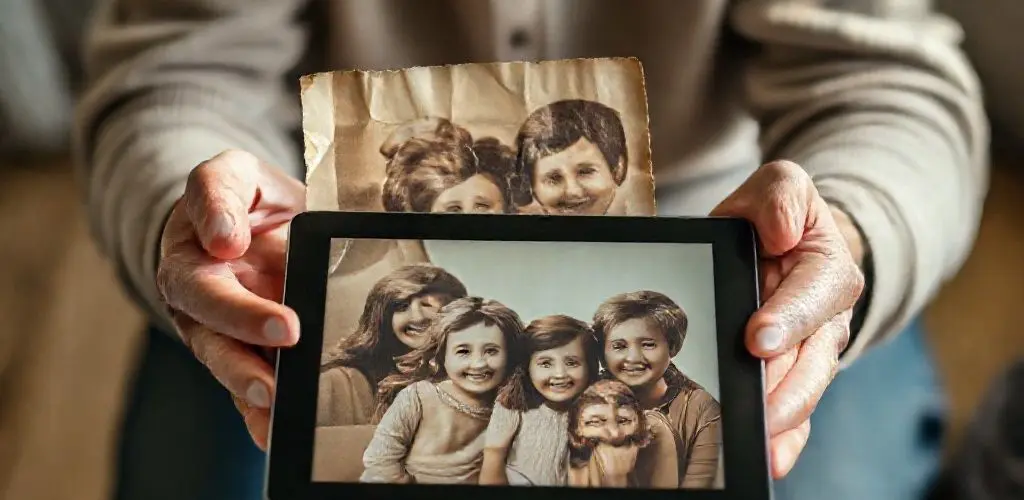
The Gentle Touch of AI: Revolutionizing Family Photo Restoration
The evening light streams through the window, catching dust motes dancing in the air, illuminating the worn cover of an old photo album.
My fingers trace the brittle edges, turning pages that whisper stories of a time long past.
Here is a snapshot of my grandfather, a young man with a proud, earnest gaze, but his face is marred by a deep, dark scratch that crosses one eye.
Further on, a sepia-toned group shot from a family picnic, its colors faded to a yellowish haze, the faces indistinct, as if peering through a dream.
That moment of recognition, even through the haze of age, is a powerful thing, a tender bridge across generations.
Yet, the physical toll of time, neglect, and even accidental damage often obscures these precious windows to our past.
We want to see those smiles, those knowing glances, those candid moments—not just remember them.
For too long, restoring such delicate, irreplaceable prints meant either painstaking hours of manual retouching or the heartbreaking acceptance of their gradual decay.
Photoshop’s new AI capabilities, powered by models like Gemini 3 with Nano Banana Pro, are revolutionizing how we restore damaged family photos.
Simple prompts now easily revive faded, cracked, and discolored prints, transforming hours of traditional work into moments.
This technology makes high-quality memory preservation accessible, maintaining authenticity with a human-first approach.
Why This Matters Now: Reclaiming Our Visual Past
These images are not just paper and chemicals.
They are often the only visual record of parents, grandparents, and entire branches of a family, making their preservation crucial for our collective heritage.
For generations, the process of bringing these damaged photos back to life was historically time-consuming, requiring hours of careful cloning and healing.
This intense manual effort limited accessibility and efficiency for many who lacked specialized skills or the budget for professional restorers.
Today, we stand at a fascinating crossroads where cutting-edge AI meets the deeply personal need for memory preservation.
The emergence of AI models within Photoshop is starting to do something truly remarkable: breathe new life into cracked, faded, and discolored family photos while still looking real.
What once seemed an insurmountable task for the average person is now becoming a legitimate and accessible option, empowered by intelligent digital tools.
The Heart of the Matter: AI’s Gentle Touch on Cherished Memories
The core problem has always been the fragility of our visual history.
Old photographs are susceptible to a myriad of ailments: scratches, tears, fading, discoloration, and water damage.
Each blemish represents a tiny erosion of a memory, a blurring of a beloved face.
Until recently, addressing these issues demanded a meticulous hand, often a professional retoucher, capable of replicating textures and tones pixel by pixel.
The counterintuitive insight is this: AI, often perceived as cold and mechanistic, is proving to be a surprisingly intuitive and deeply personal preservation tool.
It is not just for complex data analysis or futuristic interfaces; it is for helping us connect with our own past, making photo restoration moments rather than hours.
This shift represents a quiet revolution in digital preservation, placing powerful tools directly into the hands of those who care most about their family legacy.
Bringing Memories Back: An AI Case Study
Consider the practical demonstration by Anthony Morganti, who showcases how surprisingly simple it is to use the Gemini 3 model with Nano Banana Pro directly within Photoshop’s Generative Fill.
He takes a badly damaged print, one marred by creases and yellowing, and instead of intricate masks and countless adjustment layers, he selects the entire frame.
From the contextual taskbar, he opens Generative Fill and, crucially, swaps from Adobe’s default Firefly models to the partner options, ensuring Gemini 3 is driving the edit.
Morganti keeps his prompt remarkably tight: repair, restore, and remove yellow color cast.
This simple command is about as straightforward as it gets, yet the model responds with an impressive first pass.
While partner models currently offer only one variation per run, requiring regeneration if the first attempt is not perfect, the key takeaway is profound.
The faces in his examples remain recognizable.
This is where many other AI restoration tools falter, often inadvertently altering or hallucinating facial features, losing the very essence of the original image.
Morganti even tests this approach on a genuinely personal image from his own family, taken around the end of World War II, demonstrating the technology’s ability to clean up scratches, stabilize tones, and even remove pen circles without special masking.
This shows the true potential of AI image repair for old photo restoration.
What the Research Unveils: Precision and Power in AI Restoration
The practical application of AI in photo restoration reveals several key insights for anyone looking to reclaim their visual heritage.
- First, AI significantly simplifies the photo restoration process from hours to moments. This insight is supported by comparing traditional methods to the rapid, prompt-based restoration shown in Anthony Morganti’s video demonstration. This democratizes high-quality restoration, making digital image repair accessible to a much broader audience. It reduces the need for extensive manual retouching skills or professional services.
- Second, AI model responses are highly sensitive to subtle changes in prompt wording, especially concerning color. Anthony Morganti demonstrates this by running the same damaged print twice. First, he lets Gemini 3 remove the yellow cast. Then, he repeats the process with a trimmed prompt so the sepia tone stays in place. User control over aesthetic outcomes is paramount. Users must be precise with prompts to achieve desired results and maintain historical accuracy, consciously choosing to retain or alter original tones.
- Third, photo restoration and colorization are distinct AI interventions with different implications for historical accuracy. Morganti pushes further by asking the model to repair, restore, and colorize. This is where warning lights start to flash a bit. Hats change, costume details shift, and even the dog in one frame starts to drift from the original look. Different levels of intervention carry different risks to authenticity. While restoration aims to faithfully repair damage, colorization can introduce stylistic changes that alter original details, requiring user discretion and an understanding of when authenticity matters most. This is a critical distinction in damaged family photos repair.
Your Playbook for Digital Photo Revival
Embracing AI for photo restoration does not require a master’s degree in digital imaging; it requires a thoughtful, step-by-step approach.
- Start by selecting your image and target area. Open your damaged photo in Photoshop. Use the selection tools to encompass the entire image or specific damaged areas you wish to target.
- Next, activate Generative Fill and choose your model. From Photoshop’s contextual taskbar, click Generative Fill. Then, crucially, swap from Adobe’s default Firefly models to the partner options, specifically selecting Gemini 3 with Nano Banana Pro to drive your edit.
- Craft your prompt with care, keeping it concise and direct. For basic repair, try prompts like repair, restore, and remove yellow color cast. If you want to retain the original sepia tone, simply use repair, restore. Remember, AI model responses are highly sensitive to subtle changes in prompt wording, as shown in Anthony Morganti’s video demonstration.
- Iterate for best results. Since partner models like Gemini 3 offer one variation per run, regenerate the result if the first attempt is not exactly what you hoped for.
- Differentiate restoration from colorization. Be mindful that restoration and colorization are two very different levels of intervention, as Anthony Morganti highlights. If historical accuracy is your goal, stick to restoration prompts.
- Ground your expectations. Approach AI restoration as a strong first pass, not a magical fix for every problem. Morganti honestly exposes limits, suggesting you see this as a powerful starting point.
- Finally, know when to go manual. For particularly challenging archival prints, or when achieving absolute perfection on specific details, be prepared to drop back into manual retouching to finish the job. This balances AI efficiency with human precision.
Navigating the Nuances: Risks and Ethics
While AI offers incredible power for AI photo restoration, it also introduces ethical considerations, particularly regarding historical fidelity.
The biggest risk lies in inadvertently altering the original historical context or details.
As Anthony Morganti’s tests show, when you push to colorize, elements like hats change, costume details shift, and even the dog in one frame starts to drift from the original look.
This becomes a problem if you care more about historical accuracy than stylistic flair.
Practical Mitigation Guidance
- To mitigate these risks, prioritize repair, restore over colorize for images where historical accuracy is paramount. Focus on fixing damage and stabilizing tones rather than adding color.
- Always compare your edited image to the original damaged photo for comparison, serving as your truth.
- If you do choose to colorize or make significant stylistic changes, document them, as transparency is key to preserving the integrity of the image’s journey.
- Embrace imperfection selectively, recognizing that sometimes a slightly imperfect but faithful restore is more valuable than a perfect one that sacrifices authenticity.
The Right Tools, Measurable Success
The primary tool for this revolutionary approach to digital image repair is Adobe Photoshop, specifically its Generative Fill feature combined with the Gemini 3 model via Nano Banana Pro.
This partnership offers a robust solution for accessible, high-quality digital image repair.
- Maximize the volume of preserved memories by counting the number of photos restored.
- Minimize effort by aiming for less than five minutes per photo for time per restoration.
- Strive for a high image fidelity score, such as over 80 percent visual similarity to the original.
- Finally, assess user satisfaction qualitatively, focusing on realism and emotional impact.
Your restoration cadence can be flexible.
For individual cherished images, it is ad-hoc.
For larger family archives, consider batch processing sessions weekly or monthly, focusing on specific categories of damage or historical periods to maximize efficiency.
Conclusion
The dusty photo album, the faint sepia tone, the indelible scratch across a beloved face—these are more than just imperfections; they are challenges to memory, whispers of what could be lost.
Thanks to advancements in AI, these whispers can now become clear voices once more.
Photoshop’s new AI capabilities, driven by models like Gemini 3, offer a bridge between the digital future and our deeply human past.
It is a powerful tool that empowers us to easily restore damaged family photos, ensuring that the visual records of parents, grandparents, and entire family branches endure.
With a gentle prompt, we can lift those shadows, bringing forgotten faces into the light once more.
Go ahead, reclaim your family’s visual legacy with AI photo restoration.
References
Anthony Morganti.
How To Easily Restore Damaged Family Photos With Photoshop’s New AI (Video Demonstration).